Description
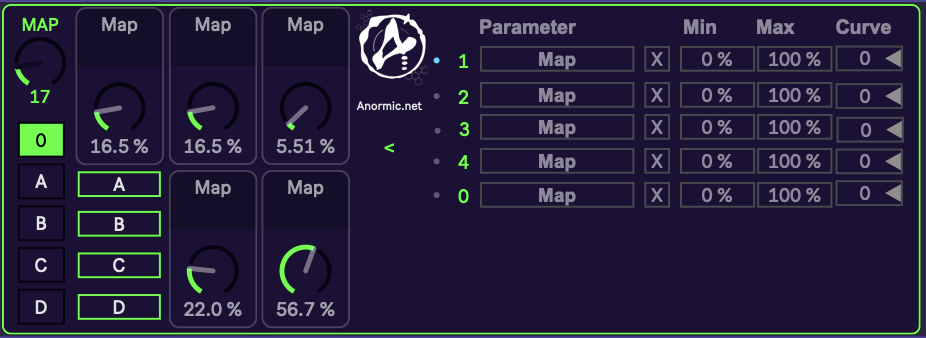
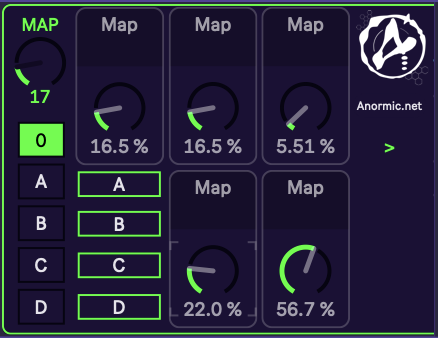
This Max for Live device turns one knob into 5. Map a single knob on your controller and switch between 5 virtual knobs, each controlling its own Ableton parameter.
You can switch between the 5 knobs in two ways:
- Buttons: Select a knob directly with the buttons 0, A, B, C, D.
- Knob: Scroll through the 5 knobs with a second knob.
Details:
- The “MAP” knob is the main control and can be MIDI mapped to your controller of choice.
- The buttons “0, A, B, C, D” select which of the 5 knobs is active. MIDI map them to buttons or pads on your controller.
- Alternatively, map a knob to the selector to switch through the 5 knobs.
- By clicking “Map” and then clicking the Ableton parameter you want to control, you instantly map the knob to the parameter.
- Click “>” to open the extended view. There you can set Min, Max and Curve for each mapping, and remove a mapping with “X”.
Demo Video: coming soon
Notes:
I made this device for my live sets, to have more options with fewer controls. With just one knob on my controller, I can control 5 different parameters and switch between them on the fly. I couldn’t find anything like it on the web, so I built it myself.
Requirements:
Ableton 12, Max 9
Legal Notice:
The owner of the work retains exclusive ownership of its intellectual property rights. This includes, among others, the rights of reproduction, distribution, public communication, and transformation. Any use that exceeds what is provided for in the applicable regulations, without prior written authorization from the rights holder, may constitute an infringement of those rights.
Therefore, if anyone wishes to reproduce, distribute, publicly communicate, or transform a work protected by “All Rights Reserved,” they must obtain express permission from the rights holder, in accordance with applicable legislation. Otherwise, using the work without proper authorization may result in legal liability.